Trip Archive, Vault recaps, photos, and sharing
Explore all completed expeditions on the interactive world map at /vault, review read-only recaps at /vault/[id], manage trip galleries with Immich or Synology Photo sync, and export trips in .trip, PDF, .ics, .gpx, or .json formats.
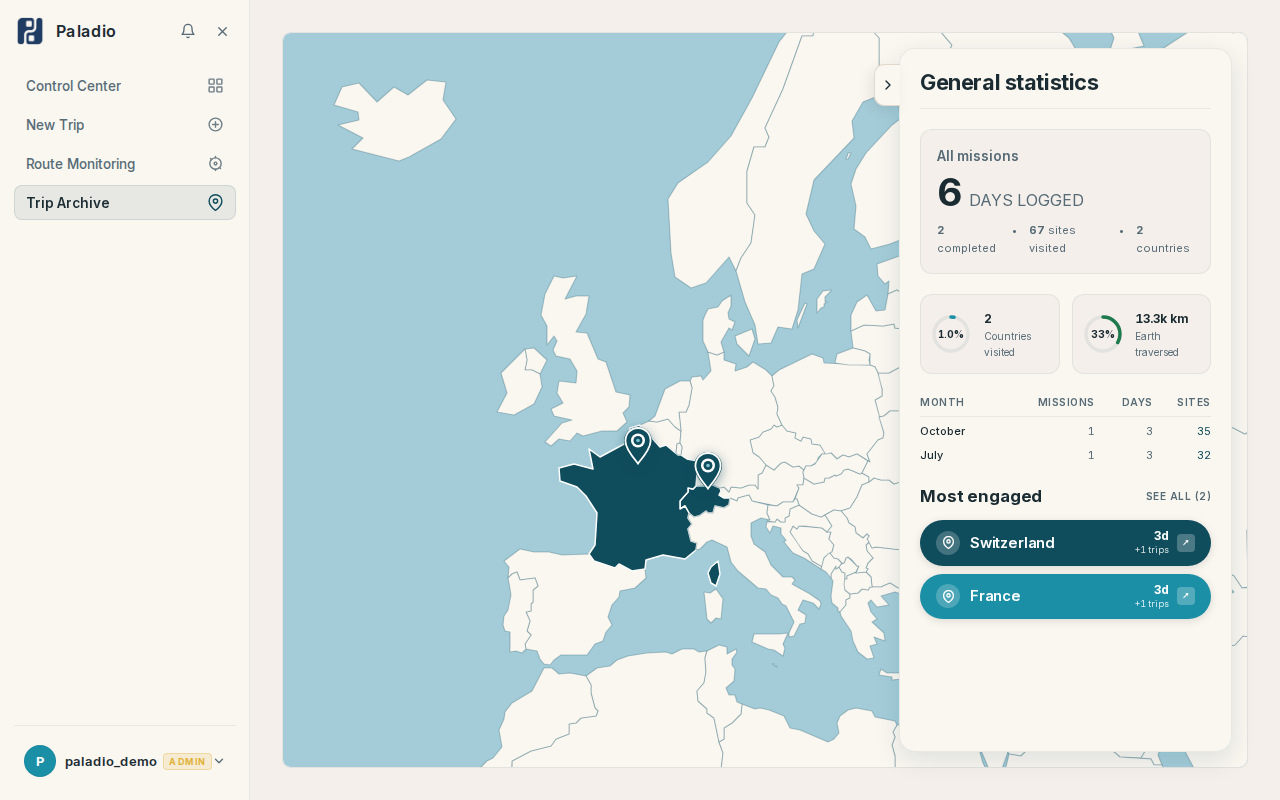
World VaultMap and lifetime travel telemetry
When you mark a trip Completed (Archived in Vault) inside Configuration, it moves onto the global /vault map alongside cumulative travel statistics.
| Vault telemetry metric | Calculation |
|---|---|
| All missions & Days logged | Total archived expeditions and cumulative travel days across all completed trips |
| Countries visited & Most engaged | Highlighted world GeoJSON country polygons plus top visited destinations ranked by trip count and days |
| Earth distance gauge | Cumulative flight and route distance compared against Earth's equatorial circumference (40,075 km) |
| Monthly breakdown | Chronological timeline table grouping completed trips by month and destination |
Click any destination in the collapsible General statistics drawer to fly the VaultMap camera directly to that country, or click a trip pin to open its recap at /vault/[id].
Completed trip recaps (/vault/[id])
/vault/[id] renders PastTripRecap as a read-only chronicle with flight strips, route maps, and four focused tabs (About, Itinerary, Costs, Photos).
- Open About to read or edit your retrospective expedition narrative and private field notes.
- Browse Itinerary, Costs, and Photos for an archive view without accidental route edits.
- Append
?workspace=1(or?force=1) to/trips/[id]whenever you want to reopen the full editing workspace on a completed trip.
Managing trip photos and NAS / Immich sync
The Photos tab inside both active workspaces (/trips/[id]) and Vault recaps (/vault/[id]) lets you upload local high-resolution images and synchronize albums from self-hosted photo servers.
- Local uploads: Drag and drop images via
PhotoUploadModal(POST /api/trips/{trip_id}/photos); Paladio serves them directly from disk (PHOTO_STORAGE_DIR). - Immich and Synology Photos sync: Configure server credentials in Settings (
/configunder Data Vault & Backups -> Photo Sync) so Paladio automatically matches trip dates to remote albums and pulls vault memories.
Exporting and sharing via Share Expedition
Click Share Expedition from any trip header (/trips/[id] or /vault/[id]) to copy the workspace link or export portable files in five formats.
| Export format | What it includes | Filtering and privacy options |
|---|---|---|
Paladio Package (.trip) |
Self-contained ZIP archive (application/vnd.paladio.trip+zip) with SHA-256 manifest, itinerary, collections, and photos |
Choose Full Vault (keeps private Wallet passes, receipts, and expenses) or Shareable (community_shareable, strips PNR/barcodes/attachments/expenses and anonymizes travelers) |
Printable Document (.pdf) |
Clean TripPrintDossier layout printed via browser print-to-PDF |
Formats daily schedules, addresses, and leg timings for offline paper backup |
Calendar Sync (.ics) |
RFC 5545 calendar events for timed stops and bookings | Filter by All Days or select specific trip days |
GPX Track (.gpx) |
Waypoints and route tracks for Garmin, OsmAnd, CoMaps, and GPS apps | Filter by All Days or select specific trip days |
Raw Itinerary (.json) |
Complete structured itinerary payload | Filter by All Days or select specific trip days |
See .trip file format specification for exact archive layout and sanitization details.