Bookings Wallet, scanning, and scannable passes
Store boarding passes, hotel confirmations, door PINs, attraction tickets, and Apple Wallet .pkpass bundles inside the Wallet tab of /trips/[id], scan barcodes locally with zero cloud OCR calls, and display high-contrast passes at airport gates.
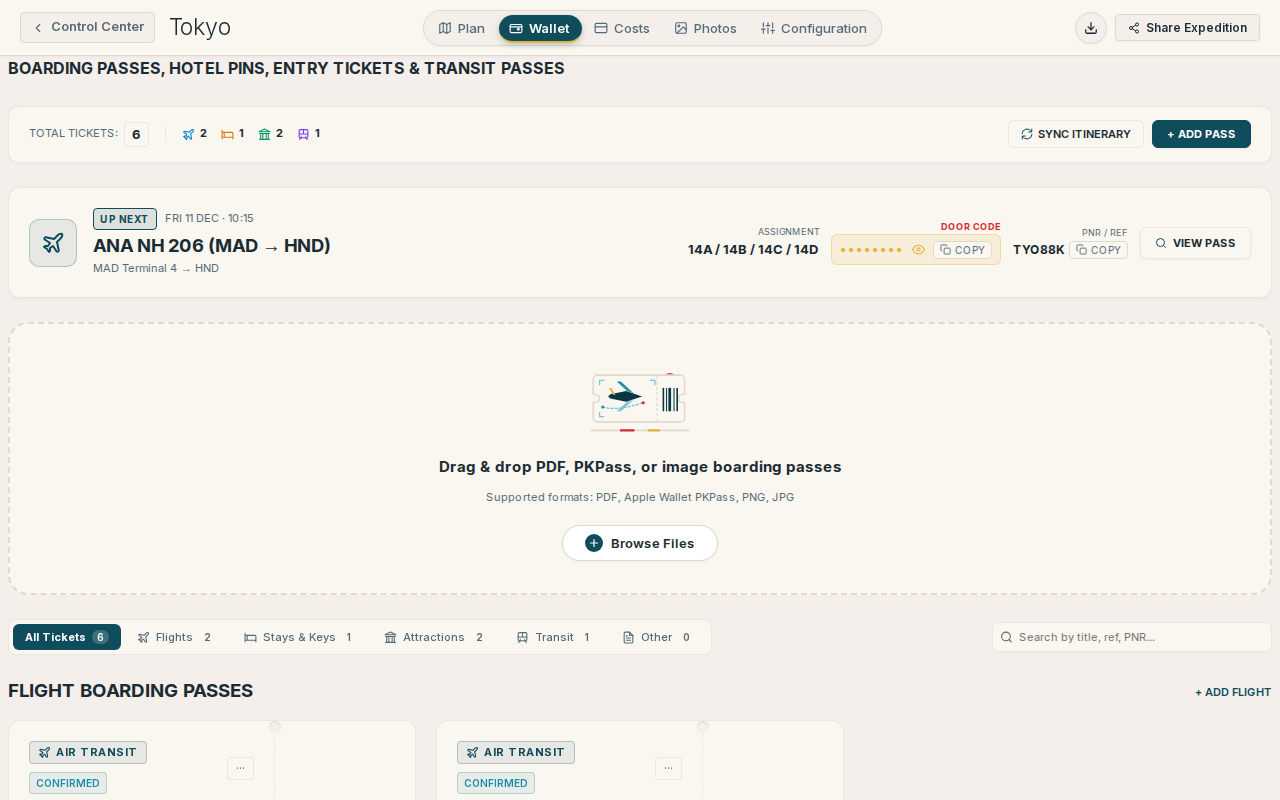
Importing tickets into WalletDropzone
Paladio extracts reservation metadata deterministically on your server using zxing-cpp for 1D/2D barcodes and tesseract-ocr + poppler-utils for PDFs and screenshots, keeping personal travel documents private.
- Open the Wallet tab inside
/trips/[id]. - Drag and drop
PDF,PNG,JPG,JPEG,WEBP,TXT, or Apple Wallet.pkpassfiles intoWalletDropzone, or click + ADD PASS to enter details manually or paste raw email confirmation text. - Review every extracted field (flight carrier, route, departure/arrival timestamps, PNR, seat, terminal/gate, venue, and decoded barcode payload) inside
ScanReviewModal. - Confirm the draft to save it to
trip_ticketsand attach original uploaded files totrip_ticket_attachments(persisted on disk underWALLET_STORAGE_DIR).
Supported ticket categories and specialized cards
TripWalletView renders tailored cards per booking category, tracks the next scheduled travel event in WalletUpNext, and surfaces gate or transit advisories automatically.
| Category filter | Card component | Key fields and behaviors |
|---|---|---|
| Flights | FlightBoardingPassCard |
Origin/destination IATA codes, flight number, terminal/gate, seat, PNR, and boarding barcode |
| Stays & Keys | HotelAccessCard |
Check-in/out times, room/unit, plus Fernet-encrypted door PINs and Wi-Fi passwords masked behind SecretField with one-click copy |
| Attractions | AttractionPassCard |
Timed-entry slot, venue address, reservation code, and entry QR/barcode |
| Transit | TransitTicketCard |
Rail/bus/ferry operator, route/zone, validity window, and scannable fare pass |
| Other | GenericTicketCard |
Insurance policies, rental cars, tours, or custom notes and attachments |
Displaying fullscreen scannable codes and syncing anchors
At airport security, boarding gates, or museum turnstiles, you can filter passes instantly and pop out high-contrast barcodes without zooming a PDF.
- Filter and search: Click
All,Flights,Stays & Keys,Attractions,Transit, orOtherpills, or type a confirmation code, venue, or flight number into the search bar. - Fullscreen scannable barcode: Click any ticket card to open
TicketDetailModal, whereCodeRendererrenders crispQR,Aztec,PDF417,Code128, orDataMatrixcodes alongside original PDF/image attachments. - Sync to itinerary: Click SYNC ITINERARY (or RE-SYNC ITINERARY) to align your trip's flight windows, hotel check-in/out depot times, and timed attraction anchors with your verified wallet passes.
Protect your secrets when sharing .trip packages
Ticket access codes (access_code, Wi-Fi keys, door PINs) are encrypted at rest with Fernet (WALLET_ENCRYPTION_KEY) and masked in MCP tool outputs. When exporting a .trip archive from Share Expedition, choose Shareable (community_shareable) to strip all PNR codes, raw barcodes, holder names, and ticket attachments, or Full Vault (full_vault) only for personal encrypted backups.