Control Center and Taste Star
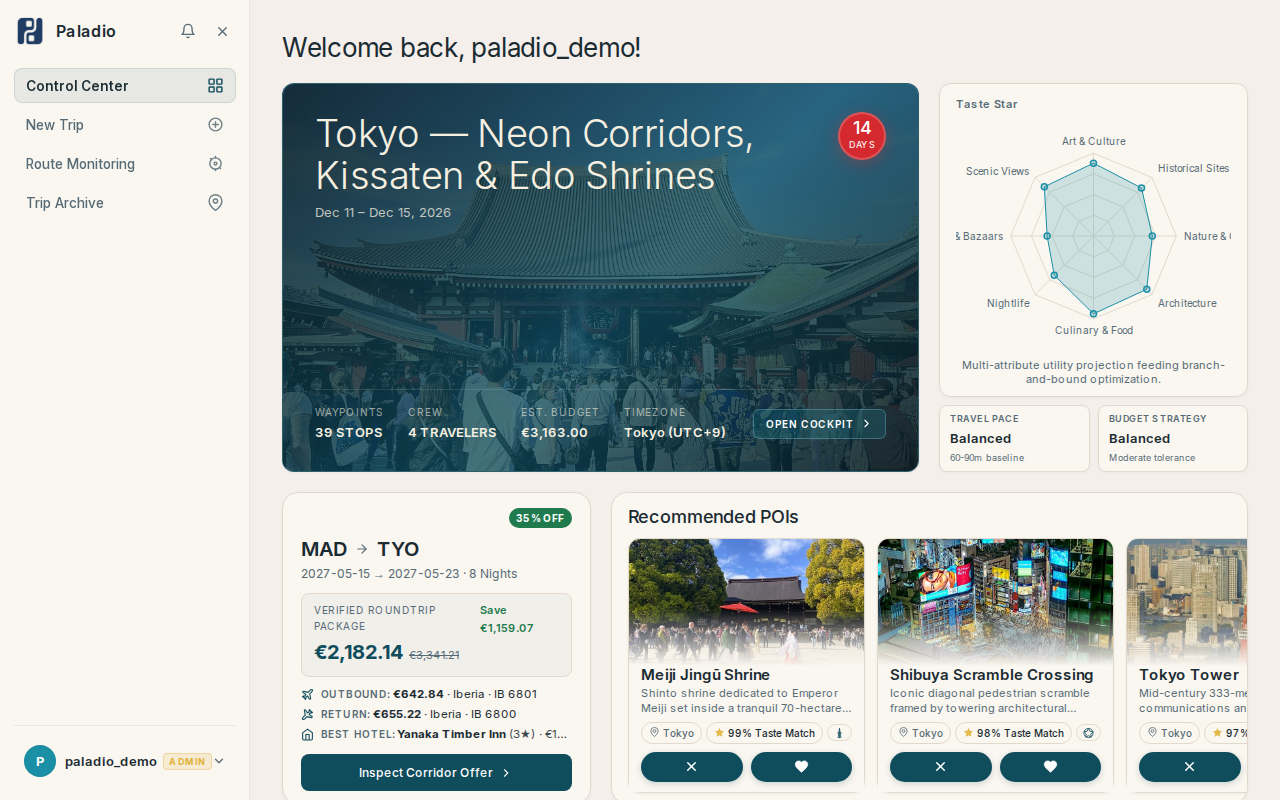
Navigate Paladio's application shell, interpret your 8-axis Taste Star radar, schedule expeditions on the operations Calendar with public holidays and Paid Time Off (PTO) markers, and manage saved Point of Interest (POI) collections from /dashboard.
Application navigation shell and appearance
Paladio adapts its global navigation, theme palette, typography, and language direction dynamically per account so the workspace matches your preferred reading density and screen size.
- Collapsible Sidebar or Floating Dock: Switch between the left
AppSidebar(toggle withCtrl+BorCmd+B) and the bottom hover-revealFloatingDockinside Settings (/config). Both expose Control Center (/dashboard), New Trip (/engine), Route Monitoring (/monitoring), and Trip Archive (/vault), while the user menu links to Settings (/config), Help Center (/help), and Sign Out. - Pacific Jazz themes and typography: Choose Pacific Jazz Light, Pacific Jazz Dark, or Silent Waters, and pair them with Inter (universal multi-script stack) or Classic (Jost display + Inter body + JetBrains Mono).
- 10 shipped locales with RTL support: Switch between Arabic (
ar, flips<html dir="rtl">automatically), Chinese Simplified (zh-CN), English (en), French (fr), German (de), Italian (it), Japanese (ja), Korean (ko), Portuguese (pt), and Spanish (es). - Global notifications: Click the header bell icon to open the slide-out notification center (persisted up to 100 items per user in
localStorage) for deal alerts, GTFS transit build completions, POI hydration jobs, and ticket scans.
Control Center widgets
Every widget on /dashboard pulls live state from PostgreSQL, pgvector semantic matching, and Celery Beat market telemetry.
| Widget | Source data | Primary action |
|---|---|---|
| Active Trip Ticket | Next upcoming or active trip in PostgreSQL | Click the boarding-ticket hero card to launch /trips/[id] with countdown, waypoint count, participant roster, and local timezone |
| Taste Star | UserTasteProfileModel 8-axis preference vector |
View scores across 8 travel categories alongside Travel Pace and Budget Strategy badges |
| Best Offer Card | Lowest verified 10th-percentile (P10) deal in /monitoring |
Inspect destination savings and jump straight to Route Monitoring or pre-fill New Trip (/engine) |
| Recommended POIs | 768-dimensional ONNX vector cosine match in pgvector | Browse personalized attractions with verified Wikimedia photos, % Taste Match, and Add to Trip |
| Upcoming Trips | Active and draft expeditions | Open a workspace or delete an unused draft |
| Saved Collections | Global TripCollectionModel lists (trip_id IS NULL) |
Organize reusable place wishlists or import stops into a trip |
Seed and tune your 8-axis Taste Star
When an account starts with a neutral preference vector (0.5 across all axes), Control Center displays a calibration banner linking to /taste-calibration.
- Open
/taste-calibrationand answer up to 8 scenario prompts (first_morning,afternoon_pace,urban_form,dining_style,after_sunset,markets_craft,budget_strategy, andcrowd_discovery), skipping any dimension you want to keep neutral. - Inspect your updated radar across
art_culture,history_heritage,nature_outdoors,architecture,food_culinary,nightlife,shopping, andscenic_views. - As you bookmark POIs into collections, complete trips, or set likes and vetoes via the optional assistant, Paladio updates your
UserTasteProfileModeland retrains ranker weights nightly via Celery Beat. - Export, reset to neutral, or delete your stored taste history anytime from Settings (
/config) or the/api/users/me/tasteendpoints.
Deterministic guardrails never sacrifice logistics for taste
High % Taste Match boosts a venue's priority during candidate selection, yet the C++20 solver enforces opening hours, meal spacing, walking fatigue limits, and district clustering so schedules stay realistic.
Operations Calendar, public holidays, and PTO mode
The interactive Calendar on /dashboard overlays active trips, archived trips, monitored P10 flight deals, statutory public holidays for your configured country, and personal PTO days across both an annual dispatch grid and a focused monthly view.
- Set your statutory holiday country under Settings (
/configin Personal Account). - Enable Holiday Mode on the Calendar to click dates and toggle personal PTO days, or clear an entire year's PTO selections in one click.
- Click any open calendar date to open
/engine?start_date=YYYY-MM-DD, click any highlighted deal bar to jump directly to/monitoring?route=<route_id>, or export all trips and monitored deal windows into a single.icscalendar file.