Costs, live currency conversion, and group splitting
Compare actual expenses against your target budget in the Costs tab of /trips/[id], convert currencies with live European Central Bank (ECB) rates, assign planned route estimates into real ledger entries, scan receipts, and settle group debts with minimal transfers.
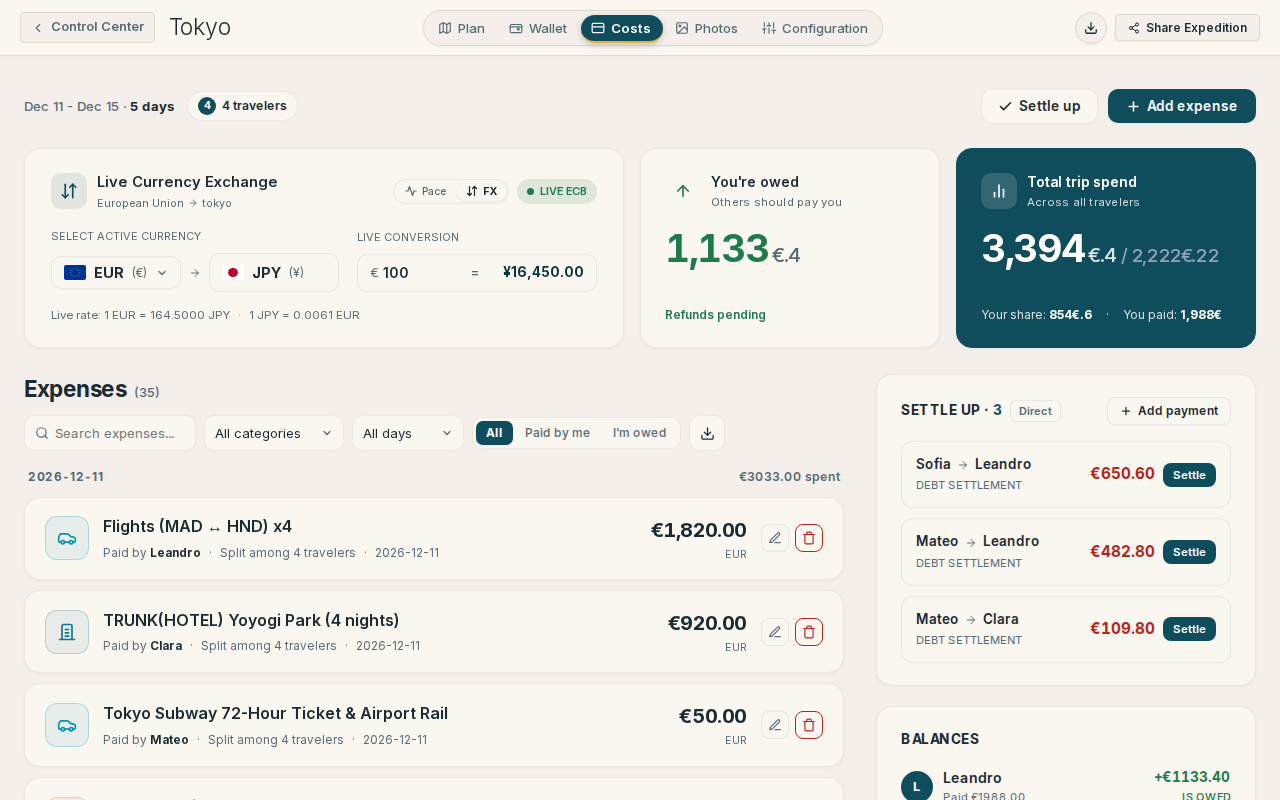
Reading cost summary cards and category breakdowns
TripCostsView separates projected route admissions from recorded expenses so you always see both committed spending and remaining headroom.
| Dashboard card | What it tracks |
|---|---|
| Pending costs / All costs paid | Itinerary stops with estimated entry prices that have not yet been assigned as paid expenses |
| You owe / You're owed / All settled up | Your net group balance across all Crew Roster splits in the trip ledger |
| Total trip spend | Recorded expenses vs target budget, paired with CategoryBreakdownWidget across flights, accommodation, transport, food, activities, sightseeing, and other |
Use the Live Currency Exchange (LIVE ECB) bar and 3D CurrencyWheelPicker to preview every figure across currencies in real time without altering stored receipt amounts.
Assigning route estimates and scanning receipts
You do not need to re-type admission costs or transit estimates already present in your itinerary.
- Scroll to any unassigned Route Estimate card in Costs and click Assign to convert that planned stop estimate into a recorded expense item (choose payer and participants).
- Click Add expense (
ExpenseModal) to log a new transaction manually, or upload a receipt image/PDF (POST /api/trips/{trip_id}/expenses/scan-receipt) to pre-fill merchant, total amount, currency, and date via Tesseract OCR. - Filter recorded entries by category, payer, or search query via
CostsFilterToolbar, or click Export CSV to download the full ledger for external accounting.
Splitting expenses and settling group balances
Paladio computes exact per-person shares across your trip's Crew Roster (trip_participants) and simplifies multi-party debts into the fewest possible bank transfers.
- Open Add expense (or edit an existing entry), pick who paid, and choose Equal or Custom split amounts across selected Crew Roster members.
- Inspect
BalancesWidgetto verify each traveler's net position (GET /api/trips/{trip_id}/settlement). - Click Settle up to open
SettlementModal, which lists the minimal sequence of peer-to-peer transfers required to bring every participant's balance to zero.